
When you buy a new phone , your phone runs like a cheetah. But after 3-4 months you would notice a small difference in performance . After 6 months your phone starts struggling to load apps. After a year your phone lags and shuts sometimes. This is not for all mobiles but for many mobiles.
Now i’ll tell you how to manage your android phone. Some of these tips might be well known and some might be new. So now let’s see what they are ???
1. Cache cleaning
When you install a new application , the app you install creates a new folder in internal memory. That won’t delete even if you uninstall the app . That folder or unwanted app folder is called junk . This is stored in the internal memory. This seems to be small but impacts more on your performance.
Imagine you installed and deleted around 300 apps in 6 months and those folders are stored in internal memory as junk! That junk is not self cleaned and slows down your mobile.
So just delete the junk once a week or once in a couple of weeks. But never use special apps to clean junk. Those apps launch some rockets and fools you by displaying ads. So
please clean junk manually. If you don’t know how to delete just see these pictures. You can use build in cache cleaner as I use in my mobile like Google Files(link in the 2nd section).
(screenshots)
2. Remove unused apps or bloatware that are pre installed
Delete apps that you don’t need. This gives you two benefits
- Helps saving storage.
- Makes your phone run faster.
Android just like any operating system needs space to run smoothly. If you’re running Low on Space, your phone will start to slow down.There is a general rule with all operating systems to leave at least 10% free. So that android runs smoothly. So remove apps that you don’t need.
If you don’t know how to find out apps that you don’t use , i suggest you to use Google Files
3. Remove widgets
It’s also a good idea to clean up your home screen. So go and find those widgets that you don’t need and remove them by long pressing and dragging up to remove. Even though the impact on system memory is minimal, they are worth clearing out if your phone is sluggish.
4. Turn off bluetooth
When you’re not using your Bluetooth, it’s advisable to turn it off. You can do this by pulling down your notification tray if Bluetooth is on tap on the Bluetooth icon to turn it off
5. Using light versions of apps
If you’re using a phone with limited memory and storage you should consider using lightweight versions of popular apps that use less resources with most of the same features. There are currently lightweight versions for Facebook , Messenger , Twitter and some more .
6. Disable Animations
Animations make all of the transitions and interactions with your operating system appear more fluid — right up until your phone starts slowing down and those animations start looking like stop motion video. If the animations aren’t flowing so well anymore, turning them off completely will both look better and free up a little processing power.
Animations make your phone feel smoother. But consumes battery and slows down your mobile . so i recommend you to close them , if you need them put them to 0.5x . This makes apps open 0.5 times faster.
Navigation :
- Open settings
- Click on “about phone’
- Software information
- Tap “Build number” for 7 Times
- “You are a developer now” This displays here.
- Go back and open “developer options”.
- Scroll down and find window , transition , animator duration.
- Put them to 0.5x (close them in order to have fast experience)
- That’s it.
7. Optimize Chrome Browser
With about 90 percent of Android users sticking with the Chrome browser, this is going to help the vast majority of you speed up your mobile web browsing. As an added bonus, it will save you some data if you aren’t on an unlimited cell phone plan.
Data Saver mode in Chrome for Android allows Google to compress the pages you are viewing by around 30 percent and up to 50 percent for video, meaning less data usage and faster browsing.
That’s all for the day. I hope you gained some knowledge about boosting android devices . meet my words tomorrow.
TODAYS APP SUGGESTION :
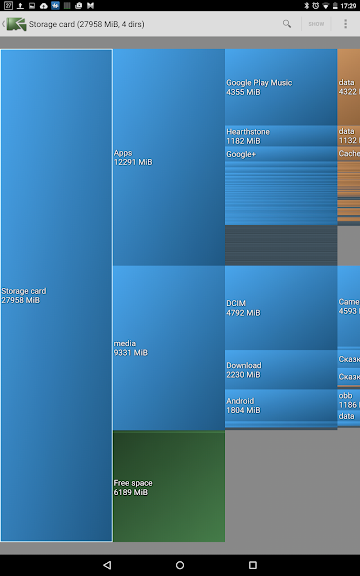
DiskUsage – This app helps you to know what occupied your mobile storage
THANKS FOR READING 👋 BYE FOR NOW 👋
.
